
On this page
- Quick answer
- FTTH installation path
- Who should use this guide
- What is a NID box?
- What is a wall outlet?
- What is an ONT?
- Detailed comparison
- Installation scenarios
- Repeat service-call mistakes
- RFQ mistakes
- RFQ checklist
- Procurement documents
- FAQ
Quick Answer: They Are Not the Same Device
Most FTTH installation confusion starts the same way: the outside fiber box, the indoor fiber socket, the ONT and the router all get called "the fiber box" or "the modem." In reality, they do different jobs. A NID box protects and hands off the fiber at the premises, a fiber wall outlet provides a passive indoor fiber termination point, and an ONT is the powered device that converts the optical signal into Ethernet.
| Device | Main role | Typical location | Active or passive | Needs power? | Connects to |
|---|---|---|---|---|---|
| NID box | Fiber handoff and protection point | Outside wall or building entry | Passive | No | Drop cable in, indoor fiber out |
| Fiber wall outlet | Passive indoor fiber termination socket | Inside room, unit or media cabinet | Passive | No | Indoor fiber in, patch cord to ONT out |
| ONT | Optical-to-Ethernet conversion | Near power and router | Active | Yes | Fiber patch cord in, Ethernet out |
| Router / gateway | LAN and Wi-Fi distribution | Inside, central location | Active | Yes | Ethernet from ONT, Wi-Fi/LAN to devices |
Where Each Device Sits in an FTTH Installation
The subscriber-side signal path often looks like this: street fiber or FTTH drop cable → NID box → indoor fiber cable → fiber wall outlet → SC/APC patch cord → ONT → Ethernet cable → router or gateway. Not every project uses every box. Some installations skip the wall outlet, some MDUs add a floor terminal upstream, and some operators place the ONT outdoors inside a demarc enclosure.
For the upstream ODN context, use the Glory Optical FTTH ODN design guide. For the customer-side construction path, the Glory Optical FTTH installation guide explains how feeder, distribution, drop and subscriber layers connect.
Single-family home path
The drop cable from the pole, pedestal or handhole lands at an outdoor fiber NID box on the exterior wall. From there, indoor fiber runs inside to a wall outlet or directly to the ONT. The ONT sits near power, and Ethernet feeds the router.
MDU or apartment path
In apartments, fiber is distributed from a building or floor terminal to each unit. Inside the unit, the fiber often lands at a fiber wall outlet, then a short patch cord connects the outlet to the ONT. This keeps the in-unit termination fixed, labeled and easier to maintain.
Outdoor ONT path
Some operators place the ONT itself outdoors, inside a weatherproof NID or demarcation enclosure, and bring Ethernet into the home. This reduces indoor fiber handling but requires a protected enclosure, a power plan and a clear demarcation policy.
Why terms change by country and operator
Naming is not standardized across markets. The same socket may be called a fiber wall outlet, fiber jack, fiber socket, PTO box or OTO. The conversion device may be labeled ONT, ONU or gateway. Anchor on function and location, not the label.
Who Should Use This Guide
Use this guide to identify which subscriber-side FTTH device belongs at each handoff point, what the installer should protect, and what the buyer should specify before sourcing passive hardware around the ONT.
| Reader type | Main focus | Decision to make |
|---|---|---|
| ISP installers and field technicians | Installation path, ONT placement and common service-call mistakes | Keep the optical side protected, and move Ethernet rather than fiber where possible. |
| MDU and building wiring contractors | Unit-level fiber outlet, media cabinet space and tenant activation point | Define where the passive indoor socket stops and where the operator CPE begins. |
| Procurement and OEM buyers | NID box, wall outlet, pigtail, patch cord and packaging requirements | Separate passive hardware specifications from ISP-approved ONT requirements. |
| ODN engineers and project planners | Demarcation, cable route, GPON/XGS-PON compatibility and handoff documents | Make the installation, maintenance and ownership boundary clear before deployment. |
What Is a NID Box in FTTH?
A NID box, or Network Interface Device box, is the point where the provider's outside fiber is handed off and protected at the customer premises. In a typical FTTH installation, it is the small outside-wall or building-entry enclosure that protects the optical termination from weather, organizes the drop-to-indoor cable transition and gives technicians a clean test point without opening the indoor outlet or ONT location.
The demarcation point between provider network and customer premises
The NID often marks the demarcation point, or demarc, between the operator network and the customer premises wiring. In copper networks this was a terminal block. In FTTH, the handoff point must protect a fragile optical splice, connector, cable transition and slack area.
What a fiber NID protects
A fiber NID typically manages the drop cable entry, splice point, SC/APC adapter, transition from outdoor drop to indoor cable, slack storage and weather sealing. If your project needs an outdoor handoff enclosure, use the Glory Optical NID box product page as a product reference, while using the installation location and cable schedule to define the final specification.

Outdoor NID box specifications
For an exterior NID, procurement should define IP rating, UV-resistant housing, cable gland size, rubber grommet, lock or screw closure, wall-mount hardware and strain relief. Pair the NID with the right FTTH drop cable or indoor drop fiber cable so the gland and cable-entry path match the actual outer diameter.
When to use IEC 60529/IP rating as a procurement reference
Use IEC 60529 / IP Code language when discussing outdoor dust and water protection. Do not treat a number on a datasheet as proof; request the actual report or certificate when the project depends on a stated IP rating.
What Is a Fiber Wall Outlet?
A fiber wall outlet is a passive indoor fiber termination point. It presents the optical fiber as a clean, labeled socket inside a room, unit or media cabinet. It does not convert the optical signal and does not output Ethernet.
Passive indoor termination for drop cable or indoor cable
The outlet terminates indoor drop cable or indoor fiber and gives the user a fixed connector point before the final patch connection to an ONT, optical network unit or integrated gateway. For product sizing, port count and faceplate options, use the Glory Optical fibre optic wall socket page as a reference, but keep the definition simple: it is a passive socket, not an active network terminal.
SC/APC adapter, splice protection and slack storage
A typical loaded outlet includes an SC/APC adapter, a fiber optic pigtail, a splice protection sleeve and a small internal slack-storage area. The patch cord from the outlet to the ONT should match the adapter polish and project specification.

Why bend radius matters inside a wall outlet
Indoor fiber is easy to damage with sharp bends, crushed cable, furniture pressure or careless routing behind the faceplate. Bend-insensitive fiber reduces risk but does not remove routing requirements. ITU-T G.657 is the main reference for bend-insensitive single-mode access fiber, and the outlet design should still provide controlled loops rather than tight corners.
Wall outlet vs fiber jack vs PTO box
Fiber jack, fiber socket, OTO, PTO box and fiber wall outlet usually describe the same type of passive indoor termination point. Mechanical design, faceplate size and regional naming vary, but none of these passive devices is an ONT.
What Is an ONT?
The ONT, or Optical Network Terminal, is the active customer-premises device that receives the PON optical signal and converts it into Ethernet or other service interfaces. The practical confusion is simple: a wall outlet only presents the fiber, while the ONT is the device that must be powered, provisioned and allowed on the operator network.
ONT installation location: near the fiber entry or near the router?
ONT placement is a field decision, not only a hardware decision. Placing the ONT near the fiber entry shortens the optical route and reduces the chance of damaging indoor fiber, but it may require a longer Ethernet run to the router or media cabinet. Placing the ONT near the router keeps Ethernet short and makes service lights easier to see, but the fiber route must be protected through conduit, wall outlets or bend-radius-friendly cable management. The best location has power, ventilation, a safe fiber path, and a clean route from the ONT Ethernet port to the router or structured wiring panel.
GPON, XGS-PON and ONT compatibility
An ONT is not a generic media converter. In many FTTH deployments it must match the operator's PON technology, provisioning method and service profile. A GPON ONT is not automatically suitable for an XGS-PON upgrade, and an XGS-PON ONT still needs the right firmware, serial-number registration, OMCI/service configuration and operator approval before it can come online. For hardware planning, this means passive parts such as a fiber wall outlet, patch cord and pigtail can often be sourced by the contractor, while the ONT is usually tied to the ISP's approved CPE list.
Who provides the ONT: ISP equipment or customer CPE?
In many ISP networks, the ONT is operator-supplied or operator-approved because it authenticates to the access network and carries the subscribed service profile. In private fiber networks, campus networks or some MDU-managed deployments, the integrator may procure approved ONTs as part of the project. Either way, do not treat the ONT like a passive NID box or wall outlet in the RFQ. Ask who owns it, who powers it, who provisions it, and who replaces it when the service is upgraded from GPON to XGS-PON.
ONT vs router vs gateway
The ONT converts the optical signal to Ethernet. The router manages the local network and Wi-Fi. A gateway may combine routing, Wi-Fi and sometimes the ONT function in one enclosure. For connector planning between the wall outlet and ONT, use the project connector specification and specify the matching fiber patch cord. If the project uses SC/APC throughout the wall outlet and ONT path, keep the patch cord polish consistent from the adapter to the ONT input.
Integrated gateway vs standalone ONT plus router
| Setup | Best fit | Planning issue |
|---|---|---|
| Standalone ONT + separate router | Projects that want the optical handoff in a utility area but Wi-Fi in a central room. | Plan an Ethernet route from ONT to router, and avoid moving the fiber side after activation. |
| Integrated ONT/gateway | Residential installs where the operator wants one managed CPE device. | The fiber route, power outlet and Wi-Fi position all converge at one location. |
| Outdoor ONT inside a NID enclosure | Deployments that keep active equipment at the demarc point. | Requires weather protection, power strategy and an indoor Ethernet handoff. |
NID Box vs ONT vs Fiber Wall Outlet: Detailed Comparison
| Item | NID box | Fiber wall outlet | ONT |
|---|---|---|---|
| Main function | Hand off and protect fiber at the premises | Passive indoor fiber termination socket | Convert optical signal to Ethernet |
| Typical location | Outside wall or building entry | Room, unit, media cabinet or wall plate | Near power and router |
| Active or passive | Passive | Passive | Active |
| Needs power | No | No | Yes |
| Optical connector | Often SC/APC adapter | Often SC/APC adapter | SC/APC patch or pigtail input |
| Cable connected | Drop cable and indoor fiber | Indoor cable and patch cord | Fiber patch cord and Ethernet cable |
| Output | Protected fiber handoff | Fiber socket, no signal conversion | Ethernet, sometimes voice ports |
| Common failure point | Water ingress, loose gland, bad splice | Tight bend, dirty end face, crushed fiber | Power loss, LOS alarm, unplugged fiber |
| Procurement focus | IP rating, cable gland, splice area | Port count, adapter, pigtail, faceplate | Operator compatibility and service profile |

Common FTTH Scenarios and Device Choices
Use the scenario table after the comparison table. It turns the device definitions into practical installation choices and helps avoid specifying a passive box when the project actually needs an active, operator-approved ONT.
| Project situation | Typical device combination | Planning note |
|---|---|---|
| Single-family home with an outdoor drop cable entering from a pole, pedestal or handhole. | Outdoor NID box + indoor fiber cable + wall outlet or direct ONT connection. | Use the NID as the protected handoff point, then keep the indoor fiber route short, labeled and bend-radius controlled. |
| Apartment or MDU unit where fiber is distributed from a building or floor terminal. | Unit-level fiber wall outlet + SC/APC patch cord + indoor ONT. | The wall outlet gives each tenant a repeatable passive handoff without reopening building-side distribution hardware. |
| Outdoor ONT deployment where the active terminal sits at the demarcation point. | Weatherproof NID or demarc enclosure + outdoor ONT + indoor Ethernet handoff. | Plan power, enclosure protection, technician access and Ethernet routing before treating this like a passive NID installation. |
| New-build home with conduit and a structured media cabinet. | Conduit to wall outlet or media cabinet + ONT near power + Ethernet to router or distribution panel. | Reserve space for the ONT, power adapter, bend-radius-friendly fiber entry and router/Ethernet distribution before the ISP visit. |
| Customer wants better Wi-Fi coverage after service activation. | Keep NID, wall outlet and ONT fixed; move router or extend Ethernet first. | Moving Ethernet is usually safer than disturbing the optical patch cord, wall outlet or activated ONT fiber connection. |
| B2B project sourcing subscriber-side passive hardware. | NID box, fiber wall outlet, SC/APC pigtail, patch cord and labels; ONT handled separately. | Specify passive parts by drawing, connector type, cable-entry range and test records; confirm active ONT approval with the operator. |
5 FTTH Installation Mistakes We Most Often See Behind Repeat Service Calls
Based on installer feedback and after-sales support conversations from single-family FTTH drops, MDU in-unit activations and subscriber-side hardware sourcing, these mistakes show up when the optical side is treated like ordinary Ethernet cabling. The passive parts look simple, but a tight bend, dirty connector, wrong polish type or poorly sealed entry point can create a service issue that needs a return visit.
- Moving the ONT by pulling the fiber patch cord. Leave the optical side alone where possible and extend Ethernet from ONT to router instead.
- Treating a wall outlet as an ONT. A wall outlet is passive and cannot output Ethernet; it only presents the fiber.
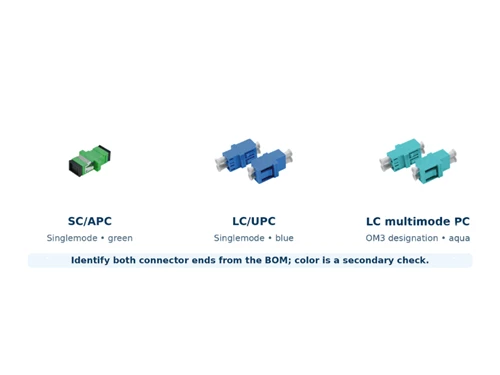
- Mixing SC/APC and SC/UPC connectors. APC and UPC polish types should not be mated in the same port path.
- Bending indoor fiber too tightly behind furniture. Tight bends can cause macrobending loss and intermittent service symptoms.
- Installing the NID without proper sealing. A loose gland, missing grommet or uncapped port can create moisture ingress weeks after installation.
Connector cleanliness also matters. IEC 61300-3-35 defines connector end-face inspection criteria; build inspect-clean-reinspect into installation and acceptance, especially when a wall outlet or loaded terminal box is pre-terminated.

7 Common FTTH RFQ Mistakes We See in ISP Installer, MDU Contractor and OEM Buyer Reviews
Based on RFQ reviews from ISP installers, MDU contractors and OEM buyers sourcing outdoor NID boxes, indoor wall outlets, pigtails, patch cords and subscriber-side termination kits, the missing details below are the items that most often delay quotation, production confirmation or field installation.
| Common missing information | Field consequence | Better RFQ wording |
|---|---|---|
| Only writing "fiber wall outlet" | Supplier cannot know SC/APC vs LC/UPC or 1-port vs 2-port. | 1-port SC/APC fiber wall outlet, splice capacity 1–2 fibers. |
| Not stating whether the NID is outdoor | An indoor box may be selected for a weather-exposed location. | Outdoor fiber NID box, IP65 or above, UV-resistant housing. |
| No drop cable outer diameter | Cable gland does not fit and sealing fails. | Drop cable OD: 2.0 × 3.0 mm flat drop or 4.0 mm round drop. |
| Treating the wall outlet as an ONT | Buyer expects Ethernet output from a passive box. | Wall outlet is passive; ONT is active and powered separately. |
| No ONT location defined | No power outlet or router route exists at the install point. | ONT location: utility closet, living room or media cabinet. |
| SC/APC direction not specified | Adapter and patch cord polish may not match. | SC/APC adapter and SC/APC patch cord to ONT. |
| No inspection record requested | PON/LOS light issues may require a repeat visit. | End-face inspection and insertion loss record where applicable. |
RFQ Checklist for Subscriber-Side FTTH Hardware
NID box RFQ fields
- Indoor or outdoor use, IP rating, housing material and lock type.
- Cable entry count, drop cable diameter, cable gland size and strain relief.
- Splice capacity, adapter type, wall-mounting accessories and test report needs.
- Logo, neutral packaging, carton label and OEM quantity.
Fiber wall outlet RFQ fields
- 1-port, 2-port or 4-port outlet; SC/APC or SC/UPC adapter.
- Loaded or unloaded configuration, pigtail length, splice capacity and cable entry.
- Faceplate color, labeling, packaging, mounting type and quantity.
Patch cord and pigtail RFQ fields
- SC/APC to SC/APC patch cord, length, jacket type and connector polish.
- Factory-terminated pigtail type, fiber type, length and insertion-loss requirement.
- End-face inspection record or batch test report where the project requires it.
1-port FTTH fiber wall outlet, single-gang faceplate, SC/APC adapter, pre-spliced SC/APC pigtail, splice capacity 1–2 fibers, internal slack storage with bend-radius management, white faceplate, port label and neutral packaging. Quantity: ___.
Outdoor fiber NID box, UV-resistant housing, IP65 or project-specified protection, drop cable entry with cable gland sized for the selected cable, internal splice area, SC/APC adapter handoff, screw or lock closure, wall-mount kit and strain relief. Quantity: ___.
Procurement Documents to Request for NID Boxes, Wall Outlets and ONT Handoff
Do not use standards as decoration. Use them to define the document package the supplier must provide before order release. The goal is to verify the enclosure, cable entry, connector interface and test record for the exact product or batch being purchased.
| Document to request | Applies to | Why procurement needs it |
|---|---|---|
| Mechanical drawing | NID box, wall outlet, termination box | Confirms housing size, cable-entry position, adapter location, splice space, slack storage, mounting holes and service access. |
| IP test report or certificate | Outdoor NID box or outdoor terminal enclosure | Uses IEC 60529 / IP Code language to support stated dust and water protection where the project requires an IP rating. |
| Cable-entry and gland range | NID box, outdoor terminal, wall outlet | Verifies compatible drop cable or indoor cable outer diameter, gland size, rubber grommet fit and strain-relief method. |
| Fiber routing and bend-radius confirmation | Indoor wall outlet, compact terminal box, pigtail routing | Shows that internal routing space matches the selected access fiber. ITU-T G.657 is relevant when bend-insensitive single-mode indoor fiber is specified. |
| Connector end-face inspection record | Loaded wall outlet, pigtail, patch cord, pre-terminated assembly | Supports connector cleanliness and defect acceptance using IEC 61300-3-35 criteria where the project requires inspection records. |
| SC adapter / connector interface specification | SC/APC wall outlet, NID handoff adapter, patch cord | Confirms connector interface compatibility; IEC 61754-4 is the relevant SC connector interface reference. |
| Patch cord and pigtail batch test report | Patch cord, pigtail, loaded wall outlet, pre-assembled kit | Links insertion loss, return loss where applicable, connector type, batch number and traceability to the shipped goods. |
| ONT approval or service-profile confirmation | ONT, integrated gateway or active CPE | Confirms whether the ONT is ISP-supplied, operator-approved, GPON/XGS-PON compatible and provisioned for the correct service profile. |
| Compliance document package | B2B procurement and OEM supply | Collects RoHS, CE, ISO 9001 or other requested files. Do not publish compliance claims unless the supplier provides the actual documents. |
For subscriber-premises installation background, the FOA FTTH customer premises reference is useful for understanding where the ONT may be placed and how the outside-to-inside fiber path is handled.
NID Box vs Wall Outlet vs ONT: Final Recommendation
The best subscriber-side FTTH design is the one that makes responsibility obvious at handoff, installation and maintenance. Put the outdoor handoff where technicians can access and seal it, put the indoor fiber endpoint where the customer can connect service without exposing bare fiber, and place the active terminal where power, Ethernet routing and future upgrades are manageable.
For procurement, split the bill of materials into two layers: passive hardware that can be specified by drawing, connector type and cable-entry range; and active CPE that must be approved for the operator's GPON or XGS-PON network. That separation prevents a common sourcing error: buying a clean wall outlet or NID box correctly, then discovering the ONT location, power plan or service-profile requirement was never defined.
FAQ
Q: Is a NID box the same as an ONT?
A: No. A NID box is normally a passive handoff and protection point at the premises. An ONT is a powered device that converts the optical signal into Ethernet.
Q: Is a fiber wall outlet the same as an ONT?
A: No. A fiber wall outlet is a passive indoor fiber termination point. It does not convert optical signals and does not output Ethernet.
Does the fiber cable plug directly into the router?
Usually no. The fiber terminates at an ONT or an integrated gateway. A standard router receives Ethernet from the ONT, not fiber.
Q: What connector is normally used in FTTH wall outlets?
A: SC/APC is common across many FTTH networks because of its low back reflection, but the connector type should always follow the operator or project specification.
Q: Where should the ONT be installed?
A: Near a power outlet, close to the router or Ethernet distribution point, and on a fiber route that respects bend radius and avoids crushing or sharp bends.
Q: What should I include in an FTTH wall outlet RFQ?
A: Include port count, adapter type, splice capacity, pigtail configuration, indoor cable type, mounting method, faceplate and labeling, packaging, test-report requirements and quantity.
Q: Is ONT the same as ONU?
A: ONT and ONU are closely related terms in PON networks. In many FTTH customer-premises discussions, ONT refers to the subscriber-side terminal device, while ONU may be used more broadly or by some operators. Follow the operator specification.
Q: Is a fiber jack the same as a fiber wall outlet?
A: In most FTTH installation discussions, fiber jack, fiber socket, PTO box and fiber wall outlet refer to the same kind of passive indoor fiber termination point. Mechanical design and regional naming can vary.
Q: Do all FTTH homes need a NID box?
A: Not every FTTH installation uses a separate outdoor NID box. Some installations use a compact indoor termination point or outdoor ONT enclosure. The need depends on operator practice, building type, demarcation policy and cable route.