
What is a NID box?
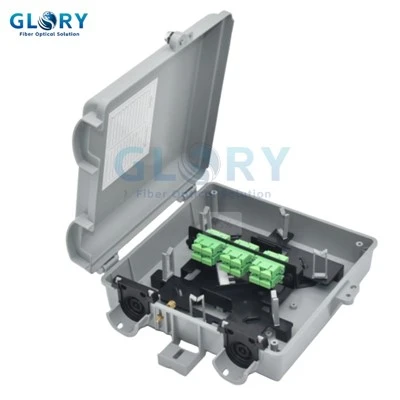
A NID box - short for Network Interface Device - is the physical box that separates the carrier's network from the customer's premises wiring. In telecommunications, the NID is defined as the device that serves as the demarcation point between the carrier's local loop and the customer's inside wiring; the operator owns everything up to and including the NID, and everything past it is the customer's responsibility. In a fiber-to-the-home (FTTH) deployment, the NID box is a weatherproof enclosure mounted on or near the subscriber's home, where the operator's drop cable terminates and the indoor cable running to the ONT begins.
In plain terms: it is a small sealed box on the outside wall that says "the network stops here." It protects the optical termination from weather, and it gives a technician a clean place to test the line without entering the house. The fiber version is the same demarcation concept that has existed in copper telephony for decades, adapted for an optical termination - which is why older specs and field crews sometimes still call it a "network interface unit," "telephone network box," or simply "the demarc." In Australia's National Broadband Network, the equivalent device is called a Network Termination Device (NTD).
Where is a NID box installed?
A typical FTTH link runs from the central office outward: OLT → feeder cable → distribution closure → drop cable → NID box on the subscriber wall → indoor patch cord → ONT. The NID is the last protected enclosure before the optical signal enters the home. Upstream of it sits a multiport service terminal (MST) or a fiber distribution box serving a group of subscribers; downstream sits the customer's active equipment.

Physically, where the box goes depends on the building type. On a single-family home it is wall-mounted near the service entry, ideally under an eave for shade. In a multi-dwelling unit it usually lives in a corridor or riser closet rather than on an exterior wall. On rural routes it may hang from a strand wire or clamp to a pole, and in some networks it is pedestal-mounted at grade. Each of those environments changes the sealing and impact requirements, which is why the same "NID" label can sit on enclosures with very different IP ratings - a point worth holding onto before reading any spec sheet.
A NID serves a different role from shared access enclosures; the fiber distribution box vs NAP box vs termination box comparison shows where each belongs in the ODN.
What does a NID actually do?
A NID has three jobs, and they are worth separating because buyers often pay attention only to the second one.
1. It defines ownership
This is the function the device is named for. Everything up to and including the NID belongs to the operator; everything past it belongs to the customer. That single dividing line is what turns a vague "the internet is down" call into an answerable question - and it is the reason the NID has contractual standing in carrier interconnection agreements, not just engineering significance.
2. It protects the optical termination
The fiber splice or connector at the customer boundary is fragile and sensitive to moisture, dust, and UV. The NID enclosure shields it for the 15-to-25-year service life of the drop. Most of this guide's later sections are really about how well a given box performs this one job.
3. It provides a test point
Inside the NID, a technician can put an optical power meter or OTDR on the line and confirm loop integrity without entering the home. If light is good at the NID, the fault lies in the customer's equipment; if not, it is the operator's. This is the operational heart of the device: it lets a field crew localize a fault before a second visit is even scheduled, which is the main reason a well-placed NID reduces repeat truck rolls - the single largest variable cost in last-mile operations.
The NID earns its keep on the day something breaks, not the day it is installed. A box with a clean, accessible test point and legible port labeling pays for itself the first time a crew can close out a fault from the curb instead of waiting for the homeowner to be available. Treat the test access and the labeling as functional requirements, not afterthoughts.
NID vs ONT - the distinction that matters most
This is the single most common point of confusion in FTTH documentation, and it is worth getting exactly right because the two devices are not interchangeable, are owned and installed differently, and fail for different reasons.
The short version: a NID is passive, an ONT is active. The NID has no power, no electronics, and no diagnostics built in - it is a protective enclosure around a fiber termination. The ONT (Optical Network Terminal) draws power, runs a chipset, and converts the optical signal into Ethernet, RJ-11 voice, or coax/IPTV outputs the customer's router and devices can use. In a standard residential install, the NID is the sealed box outside on the wall; the ONT is the powered unit inside near the router.
| Attribute | NID box | ONT |
|---|---|---|
| Type | Passive enclosure | Active electronic device |
| Power | None | Mains AC (often with battery backup for voice) |
| Function | Demarcation, protection, test access | Optical-to-electrical conversion; service interface |
| Typical location | Outdoor wall, pole, or pedestal | Indoors, near the router |
| Outputs | Fiber only (a termination) | Ethernet, RJ-11, coax |
| Replaced when… | Physically damaged or the seal fails | PON generation upgrades (GPON → XGS-PON) |
Two deployment patterns - and where the boundary actually falls
In the most common pattern the two are separate: a sealed NID outside terminates the drop, an indoor patch cord runs through the wall, and the ONT sits inside. The demarcation is unambiguous - it is the NID. In a second pattern, particularly in some North American carrier designs, an outdoor ONT combines the weatherproof enclosure and the active electronics into one unit on the exterior wall. There, the demarcation and the conversion happen in the same box, and people sometimes loosely call that combined unit "the NID." Functionally it is still useful to keep the roles separate: the demarcation/protection role is the NID role; the conversion role is the ONT role, whether or not they share a housing.
The responsibility boundary, stated plainly
Because the NID is the demarcation, a fault on the NID side is the operator's to fix and a fault past it is the customer's. The ONT, although it is the customer's active gateway, is normally operator-supplied and operator-maintained equipment - so the ownership line (at the NID) and the equipment-support line (which often includes the ONT) are not the same line. Spelling this out in the service agreement avoids the most common field dispute: who is responsible when the ONT itself is the problem.
"Is the NID the same as the modem?" No. A residential modem (or router) is firmly on the customer side of the demarcation and is usually customer-owned. The ONT is the closest fiber-era analog to a modem - it does the signal conversion - but it sits at the boundary and is typically the operator's. The NID is neither; it is the passive box that marks the boundary.
NID vs fiber termination box vs MST
Datasheets routinely blur these terms, partly because the same physical enclosure can play more than one role depending on how it is provisioned. The clean way to keep them apart is by where they sit and how many subscribers they serve.
| Device | Location | Port count | Holds a splitter? | Typical IP rating | Function |
|---|---|---|---|---|---|
| NID box | Subscriber wall | 1–4 | No (usually) | IP55–IP68 | Demarcation + termination for one customer |
| Fiber Termination Box (FTB) | Indoor wall / closet | 2–24 | Optional | IP30–IP65 | Termination for one customer or a small group |
| MST / NAP box | Pole / pedestal | 4–16 | Yes (1×4 to 1×16) | IP67–IP68 | Drop distribution to multiple subscribers |
| FDB / FAT box | Building base / aerial | 8–64 | Yes | IP65–IP68 | Splice + split + distribute to a building or block |
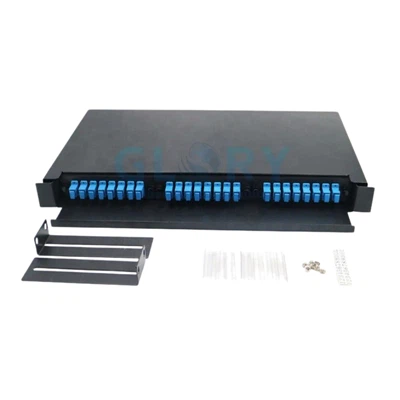
In practice the line between an FTB and a NID is functional, not physical: the smallest 2-port termination box is frequently deployed as a single-subscriber NID, while a 16- or 24-port unit can serve an MDU corridor as a multi-tenant NID. The Glory fiber termination box range spans both ends of that spectrum.
What's inside the enclosure
Housing material
A NID lives outdoors for a decade or more and has to take rain, ice, UV, and a wide temperature swing without cracking or yellowing. Two materials dominate. UV-stabilized PC+ABS composite - a polycarbonate/ABS blend - holds color and impact rating (typically IK08–IK10) across the operating range and is the default for residential FTTH NIDs. Die-cast aluminum is used where impact resistance beyond plastic grades is required; it is heavier and more expensive and less common on residential drops. One caution from the field: non-stabilized ABS yellows and embrittles relatively quickly under strong UV, so "UV-stabilized" is worth confirming in writing rather than assuming.
Sealing system - where boxes actually fail
If a NID fails outdoors, water is usually the reason, and it almost always enters at one of three places: the lid seal, the cable-entry grommet, or an unused-port plug. The physics are the same ones that drive sealing failures in direct-buried splice closures, where field surveys have repeatedly found moisture intrusion to be a leading cause of degradation. Two design choices reduce the risk: a dual-gasket lid (a silicone O-ring plus a compression gasket holds up better through freeze-thaw than a single gasket), and grommets matched to the actual cable outer diameter rather than a one-size-fits-all entry. A grommet sized for a fatter cable than the one installed will weep at the first heavy rain.
Internal fiber management
Inside is a small splice tray holding a handful of splices plus a coil area for slack. The bend-radius rule is the one not to compromise: standard G.652.D fiber should not be coiled tighter than its rated minimum bend radius, and well-designed trays enforce a safe radius by physical geometry so an installer cannot over-coil "just one more loop." Storing a few meters of slack inside is what makes a future re-splice possible without pulling new cable - a small design feature that quietly determines maintainability years later.
Adapter plate and connectors
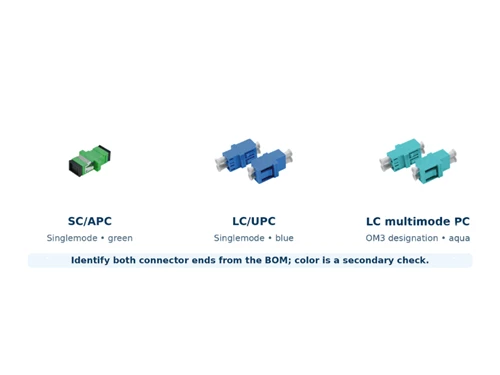
The adapter plate is where the operator-side and customer-side connectors meet. SC/APC (green, angled physical contact) is the global FTTH default because its high return loss suits video and 10G-class services. SC/UPC (blue) is cheaper but its lower return loss makes it unsuitable for analog video and high-speed PON. Hardened/OptiTap-style connectors are factory-sealed and plug in without field splicing; they are common in North American carrier networks. A NID that accepts more than one adapter type lets an operator stage a single enclosure SKU across territories with different connector ecosystems.
Specifications that matter when buying
IP rating - match it to the location, don't over-buy
IP ratings are defined by IEC 60529; the two digits describe protection against solids and against water. For NIDs the practical ladder is roughly: IP54–IP55 for sheltered or indoor placements, IP65 for a standard exterior wall mount, IP67 for exposed pole mounts, and IP68 for buried or flood-prone locations. A common procurement mistake is over-specifying - paying for IP68 on a box that sits under an eave gains nothing. Pick the rating for the environment the box will actually live in.
| Rating | Dust | Water | Typical use |
|---|---|---|---|
| IP54 | Limited ingress | Splash from any direction | Indoor MDU corridors |
| IP55 | Limited ingress | Low-pressure jets | Sheltered exterior, hallways |
| IP65 | Dust-tight | Water jets | Standard exterior wall mount |
| IP67 | Dust-tight | Temporary immersion (1 m, 30 min) | Pole mount, exposed weather |
| IP68 | Dust-tight | Continuous immersion at depth | Buried / flood-prone areas |
Environmental class - Telcordia GR-49
For North American carrier work, the controlling reference for outdoor NIDs is Telcordia GR-49, which defines environmental classes spanning normal, severe-climatic, and flooded conditions. The practical implication is to specify the class on the purchase order: a NID qualified only to the mildest class, deployed in a coastal or snow-belt environment, is unlikely to reach its intended service life. An enclosure rated across a wide temperature band (for example −40 °C to +85 °C) covers the normal and severe classes together.
Port count - the most common re-order trigger
Under-specifying port count is, in field experience, one of the most frequent causes of having to swap a box. A single-port NID is cheap right up until the customer adds a second service and the crew has to replace the whole enclosure. A reasonable planning rule for any install with a plausible service-mix forecast is to specify for actual demand plus a margin, rather than for today's minimum.
Connector grade and the optical budget
Connector quality is where future-proofing lives. At today's GPON speeds a marginal UPC connection may pass; at XGS-PON's 10 Gbps and beyond, return-loss margin disappears quickly, and APC becomes effectively mandatory. Because every NID lid has to be opened in the field to change a connector, specifying APC up front on any network that may carry 10G-class services is far cheaper than retrofitting later. The relevant connector test methods sit under IEC 61300.
Compliance to require in writing
For a carrier-grade procurement, ask for documentation against the standards that actually bear on the product: Telcordia GR-771 (splice-closure generic requirements - sealing, impact, aging), GR-49 (outdoor NID environmental classes), IEC 60529 (IP rating), IEC 61300 (connector test methods), UL 94 V-0 (housing flame retardancy), and RoHS + CE for EU markets. Treat the existence and currency of these reports as part of the spec, not a formality.
For available enclosure configurations, review the outdoor fiber NID box product page before specifying port count, adapters and cable entries.
Installation considerations
A NID is simple to install and easy to install badly. The recurring field mistakes are mechanical, not optical, and most of them are designed out at the procurement stage and then undone at the wall.
Mount to solid wall (concrete, brick, solid timber), not hollow siding. Place it at a working height a technician can reach, and under an eave where possible - shade meaningfully extends the housing's UV life.
Match the grommet to the cable OD and fit it before threading. Anchor the strength member to the strain-relief clamp - never let the bend load fall on the fiber. For armored drops, bond the armor to the ground lug.
Either fusion-splice (clean, cleave, splice, protect the splice in the tray) or plug a pre-connectorized hardened drop into the factory adapter until it clicks. Keep caps on every connector during any pause in the work.
Confirm continuity (VFL), read receive power at the test port, and - on new construction - baseline the link with an OTDR for future fault diagnosis. Then label the port and record the readings. The documentation is what makes the network maintainable in year five.
Two environmental-protection points deserve emphasis because they are cheap to get right and expensive to get wrong. First, seal every unused port - an open knockout is an open invitation to water. Second, do not use household silicone sealant near the fiber; ordinary cure-by-acetoxy silicones can outgas and contaminate connector end-faces. Use only sealants and plugs intended for the enclosure.
For the installation boundary between the outdoor enclosure, subscriber electronics and indoor outlet, see NID box vs ONT vs fiber wall outlet.
Common failure modes - and how to avoid them
Four problems account for most NID failures in the field, and all four are preventable at spec or install time rather than in the truck.
Water ingress at the cable entry
The dominant outdoor failure. Prevention is unglamorous: a dual-gasket lid, a grommet sized to the actual cable, sealant on every unused entry, and the lid latched to the correct torque so the gasket is compressed evenly. Most "mystery" insertion-loss creep on outdoor drops traces back here.
UV degradation of the housing
Non-stabilized plastic embrittles and yellows under sustained sun, especially in hot climates. The fix is purely procurement: insist on UV-stabilized housing material and, where it matters, ask for the weathering test reference behind the claim.
Bend-radius violations in the tray
An installer over-coiling slack to fit "one more loop" introduces micro-bending loss that worsens with thermal cycling - a slow-burn fault that is hard to diagnose later. The defenses are a tray whose geometry physically refuses too tight a coil, plus crew training.
Connector end-face contamination
A single fingerprint on an APC end-face can add a meaningful insertion-loss spike and is invisible without a scope. Clean every end-face before mating, inspect under magnification, and never leave a connector uncapped during the work.
People Also Ask - straight answers
-
Q: What is a NID box?
A: A NID box is a weatherproof enclosure that marks the demarcation point between a telecom carrier's network and the customer's premises wiring. In FTTH it sits on or near the subscriber's home, terminates the operator's fiber drop cable, protects that termination from the weather, and gives a technician a place to test the line. It is passive - no power, no electronics.
Q: What does NID stand for?
A: NID stands for Network Interface Device. The same device is also called a network interface unit (NIU), telephone network interface (TNI), or - in Australia's National Broadband Network - a network termination device (NTD).
Q: Where is a NID installed?
A: At or near the customer boundary: on the exterior wall of a single-family home, in a corridor or riser closet of an apartment building, or on a pole or pedestal on rural and aerial routes. In the FTTH chain it is the last protected enclosure before the indoor cable runs to the ONT.
Q: What is the difference between a NID and an ONT?
A: The NID is passive and the ONT is active. The NID is the sealed box (usually outside) that terminates and protects the fiber and marks where the operator's responsibility ends. The ONT is the powered device (usually inside) that converts the optical signal into Ethernet, voice, and video for the customer's equipment. They are separate products, though some outdoor units combine both roles in one housing.
Q: Is a NID the same as a modem?
A: No. A modem or router is on the customer side of the demarcation and is usually customer-owned. The ONT is the fiber-era device that does the signal conversion a modem used to, but it sits at the boundary and is normally operator-supplied. The NID is neither - it is the passive box that marks the boundary rather than doing any conversion.
Q: Does a NID box need power?
A: No. A NID is purely a protective enclosure for a fiber termination - no battery, no power supply, no electronics. The active device that needs power is the ONT inside the home.
Q: Does every FTTH network need a NID?
A: Not as a separate physical box in every case. The demarcation function is always present - a network always has a point where the operator's responsibility ends - but in designs that use an outdoor ONT, the demarcation and protection role can be folded into that combined unit rather than living in a dedicated enclosure. Where the ONT is indoors, a separate outdoor NID is the normal way to terminate and protect the drop and to keep a clean test point at the boundary.
Q: Can a NID box be installed indoors?
A: Yes - MDU corridors, basement risers, and service closets commonly house NIDs indoors, where a lower IP rating (IP54–IP55) is acceptable and reduces cost. Exterior placements need IP65 or higher.
Q: What connectors does a fiber NID box use?
A: SC/APC (green) is the FTTH default because its high return loss suits video and 10G-class services. SC/UPC (blue) is cheaper but unsuitable for analog video or high-speed PON. Hardened/OptiTap connectors, factory-sealed and field-spliceless, are common in North American carrier networks.
Q: Can a NID box fail from water ingress?
A: Yes - water is the leading outdoor failure mode. The defenses are a dual-gasket lid, a grommet matched to the cable's outer diameter, sealant on every unused entry, and an IP rating chosen for the actual environment.
A buyer's procurement checklist
For any NID specification, decide and document:
- Role and location- single-subscriber wall mount, MDU corridor, pole, or pedestal? The placement sets every other requirement below.
- IP rating matched to environment- IP65 for a typical wall, IP67 for exposed pole mounts, IP68 only where burial or flooding is real. Confirm the depth/duration behind any IP67/IP68 claim.
- Environmental class- the right Telcordia GR-49 class for the climate, stated on the PO rather than assumed.
- Housing material- UV-stabilized PC+ABS (or die-cast aluminum where impact demands it), with the UV claim confirmed in writing.
- Sealing system- dual-gasket lid and grommets sized to your actual drop cable OD, not a single universal entry.
- Port count with margin- specified for forecast demand plus headroom, since under-sizing is the most common re-order trigger.
- Connector grade- SC/APC by default on any network that may carry 10G-class services, because changing it later means opening every lid in the field.
- Compliance documentation- current GR-771, GR-49, IEC 60529, IEC 61300, UL 94 V-0, and RoHS/CE reports as applicable.
A NID box looks like a small plastic enclosure, but its real job is to make a network economically operable: a clear ownership line, clean test access, predictable failure modes, and a service life that matches the fiber it terminates. The differences between a good NID and a poor one - UV-stabilized housing, dual-gasket sealing, correctly sized grommets, the right IP and environmental class, an APC-ready adapter plate - do not show up on day one. They show up in year three, when the second truck roll either happens or doesn't.
If you take one idea from this guide: the NID is not active equipment and it is not the ONT. It is the passive box that marks where your network ends - and getting that demarcation, that protection, and that test point right is what quietly determines how cheaply the link can be operated for the next two decades.
Glory Optical Communication has engineered and manufactured fiber NID-class enclosures to ISO 9001:2015, CE, and RoHS standards since 2008, shipping to operators in 60+ countries. If you want to match a NID specification to a real deployment environment, explore the fiber termination box and NID range, request a sample, or send a specification to the engineering team via the OEM/ODM portal.