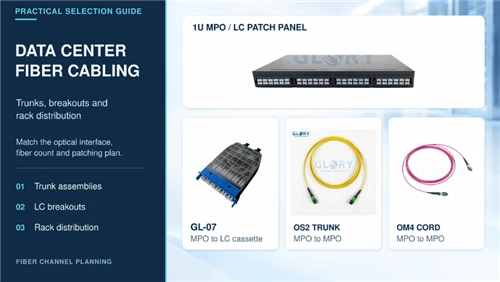


An MPO patch cord earns its place when several fiber paths need to travel together. The choice becomes more involved when that route crosses a busy tray, enters a different cabinet and finishes at several duplex equipment ports. The common cable needs protection along the route. Its two ends need enough space to connect, disconnect and be inspected without pulling on neighboring fibers.
Those requirements help explain the appeal of an MPO to LC harness. One multi-fiber connection serves the distribution side, while separate LC duplex branches serve the equipment. The arrangement can simplify the shared run, provided the jacket construction, mating interface and fiber map suit the installation.
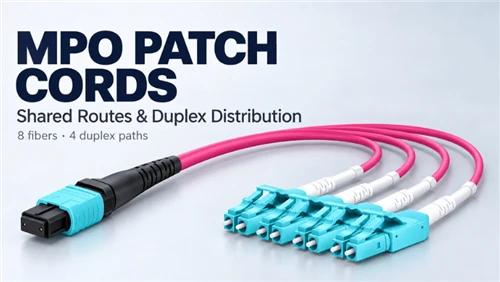
This article looks at those decisions through a 30 m OM4, eight-fiber assembly from Glory Optical. It has a double-jacket trunk, one female UPC MTP® end with an MPO interface, and four LC UPC duplex Uniboot branches. The same planning questions apply to many MPO patch cords: where the common route ends, how the connector mates and what each fiber must reach.
What an MPO patch cord carries
MPO means multi-fiber push on. The connector brings several fibers into one ferrule, so a technician can mate a group of optical paths in one operation. MTP is US Conec's branded implementation of the MPO interface. A purchase specification may therefore describe an MPO cable while identifying MTP components at the ends. The names describe related things, but they do not identify the fiber population or wiring on their own.
A cord with MPO connectors at both ends can carry grouped fibers between distribution points. A harness changes the physical presentation: the fibers remain together through the main cable, then separate into individual connectors or duplex pairs. A cassette performs a similar transition inside a housing, usually with accessible ports on a panel. Choosing among them depends partly on where the operating team wants to handle individual circuits.
Count fibers and duplex connections separately
In the assembly discussed here, eight fibers become four conventional two-fiber duplex paths. There are four LC duplex connector bodies and eight LC ferrules. Calling the cable an eight-fiber assembly is accurate. Calling it an eight-duplex assembly would double its actual capacity.
The distinction matters when a bill of materials uses the word port. A panel opening, an individual optical fiber and a duplex equipment connection may all be called a port in different documents. Write the quantities explicitly. For this build, one grouped connection leads to four duplex endpoints, with two fibers allocated to each endpoint.
Base-8 describes that fiber population. It does not mean that every connector advertised as MPO-8 will automatically mate with every other MPO interface. The ferrule arrangement, populated positions, keying and pin state still have to match the intended hardware.
The connector name also leaves the fiber category open. MPO assemblies can use multimode or single-mode fiber. Choose that category from the optical endpoints and channel design, then match the rest of the route to it. The OM4 example here belongs to a multimode installation. Changing its connector ends would not turn its glass into single-mode fiber.
Put the transition where it can be maintained
The principal routing benefit is that four pairs share one common trunk. It is easier to identify a single assembly in the main pathway than to trace four unrelated jumpers through the same run. At the equipment end, however, the four branches still need individual labels and a practical route to their ports.
Plan the transition while the port layout is still open to adjustment. A breakout hidden behind a loaded rail may save a little visible space while making the next equipment change difficult. An accessible transition lets the technician handle one branch without lifting the others out of the manager. The common section and the fanout should each be designed around the work that will happen there.
Choose the connection architecture first
An MPO to four-LC-duplex harness can appear in two quite different designs. In duplex distribution, it carries four separate two-fiber circuits from a suitable distribution interface. Each circuit has its own compatible optical endpoints. In parallel-optics breakout, the harness routes the lanes of one supported optical port to several lower-speed endpoints. The cable looks similar, but the equipment requirements are different.
Cisco lists 40G SR4 to four 10G SR and 100G SR4 to four 25G SR among its multimode breakout examples. These are supported combinations of optics and host operation, rather than capabilities created by the passive cable. A switch port, module and software configuration must all support the proposed breakout. Other optics with the same headline data rate can use a different optical arrangement.
| Connection plan | What the harness does | What to establish first |
|---|---|---|
| Four independent duplex circuits | Groups four pairs through a common route | Distribution wiring and the optical endpoints of each circuit |
| Parallel port to four duplex endpoints | Routes separate optical lanes into LC pairs | Exact modules, host breakout support and lane mapping |
| Distribution with frequent circuit changes | Can replace or complement an LC cassette arrangement | Where technicians need individual patching access |
Decide where individual patching belongs
A direct harness can work well when the four destinations are known and reasonably close together. It reduces the number of separately routed cables through the shared section. It also ties the four branches to one physical assembly. Replacing that assembly or disconnecting its MPO end affects the whole group.
A cassette and separate LC jumpers may suit a patching field that changes often. The panel provides a stable place to label circuits, and individual jumpers can be replaced or rerouted at the front. The tradeoff is more hardware, more space and additional connections to account for in the optical budget. Those costs should be weighed against the access the team actually needs.
Four separate duplex cords remain a reasonable choice for short, accessible runs with unrelated destinations. There is little benefit in forcing a shared harness into a layout where the branches immediately need to go in different directions beyond their available reach.
Start the drawing with the real endpoints and the planned maintenance access. Then select the cable family. That sequence prevents a tidy-looking harness from dictating an inconvenient cabinet arrangement.
Double jacket construction for shared cable routes
A shared tray exposes a cable to more handling than an isolated patch inside one cabinet. Other assemblies are added, bundles are lifted and cables move against supports during changes. A second jacket gives the fiber assembly another physical layer between the outside contact and the protected interior.
In the Glory Optical example, the common trunk uses inner and outer sheath layers around a reinforced fiber assembly. The source illustration shows the relationship between the sheaths, reinforcement yarn and fibers. It explains the construction concept; its layer thicknesses should not be treated as production dimensions.

Protection still depends on the pathway
The useful comparison is with an otherwise similar single-sheath construction. Two jackets can provide additional protection, but jacket count alone does not establish crush resistance, abrasion performance or suitability for an outdoor route. A clamp can still compress the cable. An exposed tray edge can still damage it. The product page provides no numerical crush rating for this build.
Place the common trunk on suitable supports and protect it at tray exits and cabinet entries. Keep the breakout transition away from a point where a bundle will be tightened. The thicker common section is intended to travel through the shared pathway; the finer branches should emerge where they can be managed separately.
Bend allowance belongs to the finished cable
A bend-insensitive fiber specification can be misleading when it is read as permission to bend the complete cord just as tightly. The glass is only one part of the assembly. Jackets, reinforcement and the transition into the connector all influence how the finished cable behaves.
For the reference build, Glory Optical lists a 7.5 mm minimum radius for the glass fiber and separate finished-cable allowances of 20 times the cable diameter during movement and 10 times the diameter at rest. Apply the finished-cable figures to the trunk route. The smaller glass-fiber number does not replace them.
| Main cable outside diameter | Minimum radius during movement at 20D | Minimum radius at rest at 10D |
|---|---|---|
| 3.6 mm | 72 mm | 36 mm |
| 4.0 mm | 80 mm | 40 mm |
| 4.5 mm | 90 mm | 45 mm |
These values are calculated from the published factors. The product lists a 3.6–4.5 mm main-cable diameter range, so the delivered configuration determines which radius applies. Radius is measured to the curve; a loop's diameter is twice its radius. A 45 mm radius therefore needs a 90 mm loop diameter before allowing for the space occupied by the cable itself.
Outside diameter also changes pathway occupancy. A round 4.5 mm cable has about 56% more cross-sectional area than a 3.6 mm cable. That comparison covers the cable body alone, but it shows why jacket count is a poor shortcut for estimating tray space. Compare actual diameters when assessing the route.
Check the turn into the cabinet
The tray run may be generous while the final entry is tight. Look at the descent into the cabinet, the turn around the rail and the service loop behind the panel. A bend that is acceptable after installation may be too tight while the cable is being moved into place. Leave the larger moving radius available during that work.
The published tensile values are 100 N long term and 300 N short term. They are limits for the specified assembly under the manufacturer's conditions, rather than target pulling loads. Confirm the approved handling and pulling arrangement. Do not use the connector housing, LC latch or a loose fanout leg to take the installation load.
The 2.0 mm branches also need their own handling instructions. Do not calculate their allowable bend from the trunk diameter or assume that their smaller size makes a sharp fold acceptable. Support the transition, leave a relaxed approach to each boot and check the fanout requirements on the order drawing.
Make room for the LC fanout
The four LC duplex Uniboot ends are the part of the harness that technicians will handle most often. Each body keeps one two-fiber connection together through a single cable entry. This reduces the number of separate tails at the equipment, but it does not remove the need for port access.

The reference assembly has 2.0 mm fanout legs and an LC-side breakout dimension of 0.91 m. At the multi-fiber end, the published breakout dimension is 0.84 m. Confirm the measurement references on the drawing before using either figure as available reach. A dimension measured from a transition to a connector is not entirely free length once the route around a manager and the approach to the port are included.
Measure the farthest branch along its real path
If four destination ports sit at different rack heights, measure each route through the intended cable management. The lowest port may be physically closest to the breakout while requiring the longest managed path. Leave enough slack to release the latch and inspect the connector, with the branch supported during the work.
Branch numbers 1–4 identify physical endpoints. Add the rack, equipment and port names to the schedule so that a replacement technician can find the right pair. Those numbers do not identify transmit and receive ferrules. Keep the branch schedule separate from the detailed fiber map, and retain both.
The multi fiber connector at the distribution end
The MPO-compatible end concentrates eight optical paths into one mating operation. Its performance depends on the alignment and contact of the fibers inside the ferrule. Guide pins and corresponding holes align the ferrules, while the keyed housing controls their mechanical orientation. The housing key does not, by itself, prove the completed channel's polarity.

The generic MTP illustration separates the ferrule, housing, spring components, rear crimp and boot. US Conec describes ferrule float and spring arrangements as part of how MTP connectors maintain physical contact. The rear termination and boot support the transition from cable to connector. They should still be kept clear of side loads and abrupt bends.
One connection also means one shared intervention
At a distribution panel, the grouped connector can simplify installation and identification. It also gives the four duplex paths a common service point. Before unplugging it, identify every circuit carried by the harness and arrange the required interruption. A change that looks like one connector operation can disconnect four services.
Keep the assembly identifier visible near the MPO end. A technician should be able to match that identifier to the four LC destinations without following the cable through the tray. This is particularly useful when several nearly identical magenta trunks enter the same panel.
Match the complete MPO mating interface
The selected reference build uses a female, non-pinned UPC MTP end. Its mating connector must provide compatible alignment pins and a matching UPC interface. An MPO adapter holds the two connectors in the required orientation; it does not supply missing guide pins or convert one polish into another.
Male MPO connectors have projecting guide pins. Female connectors have the corresponding holes. A compatible pair uses one of each. Two pinned connectors can damage one another if forced together, while two unpinned connectors lack the intended pin alignment. Confirm the connector behind the panel opening, rather than relying on the appearance of the adapter.
| Detail to confirm | What the project record should identify |
|---|---|
| Connector and ferrule arrangement | The compatible MPO interface and populated fiber positions |
| Pin state | Which mating connector is pinned and which is unpinned |
| End-face polish | UPC for this reference build and its mating interface |
| Key orientation | The orientation shown by the approved interface drawing |
| Access behind the panel | Space to release, inspect, clean and reconnect the plug |
UPC and APC are separate mating choices
The reference cable is specified with UPC at both its multi-fiber and LC ends. Do not substitute an APC interface because the connector shape appears similar. Identify polish from the equipment and component records. Housing color is useful for identification, but a color alone is an inadequate basis for approving a connection.
The same discipline applies when a supplier offers MTP as an option within a broader MPO range. The connector brand does not resolve the pin state, fiber population, polish or mapping. Put those details on the drawing and confirm them against the cassette, trunk or equipment port actually being used.
Check access with the cabinet in its normal state
A connector can fit an empty panel and become awkward after neighboring cords are installed. Check whether a technician can reach the release mechanism and insert the correct inspection or cleaning tool. Include the rear bend allowance and the clearance needed to withdraw the connector without dragging its face across adjacent hardware.
The male and female components in a generic exploded illustration represent alternatives. They do not mean that both genders are included with a female-ended cable. Treat the confirmed configuration and the mating hardware record as the description of the supplied connection.
Follow every fiber through the channel
A polarity label is useful shorthand, but the completed optical path is what has to work. The reference assembly is specified as Type B. Its MPO position map, LC pair allocation and the wiring of any cassette must still be considered together. A branch marked 1 identifies a connector body, not which equipment transmitter should reach which receiver.
Request a drawing that states the viewing direction, key orientation and position numbering at the multi-fiber end. At the LC end, identify both ferrules of every duplex branch. Without a stated view, two people can describe the same physical connector in opposite directions and produce apparently contradictory maps.
Trace the path from the actual equipment port
For duplex distribution, begin at the transmitter of the first endpoint. Follow that fiber through its jumper, cassette or distribution wiring, across the MPO mating point and into the intended LC receiver at the destination. Then trace the return fiber. Repeat the exercise for the other three duplex paths.
For a supported parallel-optics breakout, use the optical module's lane assignments as the starting point. Each LC pair must correspond to the required transmit and receive lane. An eight-fiber count confirms the number of paths available; it does not establish where those paths sit within the interface. Use the module documentation and the harness drawing together.
An additional cassette or adapter arrangement can change what the final path looks like, even when the harness itself is correctly manufactured. This is why a Type B label on two separately purchased components is not sufficient evidence that they form the intended channel. Test the complete arrangement that will be installed.
Make the labels useful during a fault
A practical record links the cable identifier, LC branch number, destination port and two tested fiber paths. Store the manufacturer map with that record. If one duplex circuit fails, the technician can isolate the affected pair without guessing which fibers pass through the common ferrule.
Avoid solving an unexplained mapping problem by repeatedly reversing LC pairs until a link comes up. A local reversal can leave the channel record wrong or conceal a mismatch elsewhere. Some Uniboot products support controlled polarity changes, but that capability must be confirmed for the exact connector. It should not be assumed from the word Uniboot.
After an intentional change, update the record and retest the affected paths. A working link and an accurate map are both needed when the next move, addition or fault occurs.
Install and test the assembly as four documented paths
Inspect the cable before it enters the pathway. Check the build identifier against the drawing, confirm the end formats and make sure all four LC branches are present and correctly labeled. If the project requires a pre-installation baseline, complete it while both ends are accessible. A factory report is valuable, but the installed route introduces handling and mating conditions that also need to be checked.
Protect the transitions during the run
Prepare the tray, cabinet entries and end supports before moving the assembly. Keep the connector ends protected, maintain the moving bend radius and use the handling arrangement approved for that build. Guide the cable through each change of direction. A snag should be investigated at the snag point, rather than overcome with extra pulling force from the far end.
Once the trunk is in place, support it before laying out the LC branches. Keep the transition visible and leave service slack where a technician can use it. Close the cabinet door, return any sliding hardware to its normal position and check that neither action tightens a branch or presses a boot against the rail.
Inspect the MPO face and every LC ferrule
Use inspection and cleaning equipment intended for the relevant connector format. An MPO face needs inspection across its populated fibers, and each LC ferrule needs its own check. Inspect before mating, clean when needed and inspect again. A protective cap reduces exposure during handling but does not establish that the connector underneath is clean. Fluke's MPO-to-LC certification guidance specifically includes inspection of both connector formats.
Keep unused branches protected while one connection is being worked on. At a busy panel, this small handling detail helps prevent a clean branch from picking up contamination before it is connected.
Keep a result for each fiber
Verify continuity and the approved fiber map across all eight fibers. Then measure optical loss with the agreed multimode source, reference cords, wavelengths and reference method. Define the acceptance boundary before testing: an assembly result, a permanent-link result and a complete-channel result include different parts of the installation.
Record both fibers of each duplex branch, the test direction required by the project and the corresponding port names. A statement that all four links came up is useful operational evidence, but it does not replace the requested optical measurements. Keep the raw results and the test setup with the cable schedule.
If a path fails, inspect its mating surfaces and confirm the map before replacing the whole harness. Where possible, separate the harness measurement from the cassette and the rest of the channel. That makes the repair address the failed part rather than disturb four working branches unnecessarily.
Work through a 30 m distribution example
Consider four independent duplex circuits leaving a distribution area for equipment in a neighboring cabinet. Most of their route is shared. A compatible cassette presents the grouped connection, and the harness carries the fibers along the tray before its LC branches separate near the equipment. This is a duplex distribution example; it does not require one high-speed switch port to operate as four ports.
First, identify the cassette wiring and the pinned UPC mating connector required by the female-ended harness. Check the four circuits through that cassette to their original optical endpoints. At the destination, confirm each equipment port and its compatible optics. The harness changes the cable presentation along the route while those endpoints determine the optical service.
A destination schedule should identify the physical branches; the approved MPO position map and LC transmit/receive assignment remain part of the circuit record.
Next, walk the actual pathway. Measure the tray route, cabinet descent, managed approach to the distribution interface and the route to each destination. Check the farthest LC branch against its available length. Confirm whether the nominal 30 m dimension includes the end breakouts and which connector or transition reference points define it. Adding 0.84 m and 0.91 m to a nominal length without that drawing can produce the wrong order.
The product's OFNP designation and double-jacket construction are separate characteristics. One concerns the specified cable fire classification; the other concerns its physical sheath arrangement. Confirm the required cable marking and product documentation for the project instead of treating either description as a substitute for the other.
Put the agreed configuration into the order
For this build, the order description should identify 30 m OM4, eight fibers, Type B, double-jacket OFNP construction, one female UPC MTP end and four LC UPC duplex Uniboot ends. Include the approved position map, end dimensions, delivered trunk diameter and branch labels. State the required inspection and per-fiber test records, with their acceptance scope.
The Glory Optical product page provides the starting configuration. The project drawing fixes the route-dependent details, so changes to length, jacket or connector format should be reviewed as a distinct build rather than assumed to carry the same ratings.
Questions that come up before ordering
Does a double jacket make the cable suitable outdoors
No. Two sheath layers do not establish resistance to water, ultraviolet exposure or an outdoor environment. The example here is an indoor assembly. Select an outdoor-rated construction when the pathway requires it, including the appropriate transitions into the building.
Can one LC branch be moved while the others remain connected
The separate LC ends allow an individual duplex connection to be handled. Support the branch so that movement does not pull on the common transition or adjacent leads. Disconnecting or replacing the shared MPO end interrupts all four paths carried by the assembly.
Is a harness always easier to maintain than a cassette
It depends on where changes occur. A direct harness can suit four stable destinations. A cassette with separate LC jumpers gives more individual access at a frequently changed patching field. Compare the required access, available space and complete optical path before choosing.
Choose the cable around the route and the next service task
For a longer shared indoor run, a double-jacket MPO harness can keep four pairs together through the pathway and present manageable duplex ends at the equipment. Its value depends on ordinary installation details: a supported trunk, a reachable transition, the correct mating connector and a fiber map that matches the channel.
When requesting a build, send the route dimensions and four destination port names alongside the connector requirements. That gives the supplier enough information to review both ends of the assembly. Glory Optical's MPO to 4 LC Duplex Breakout Cable is one example of this arrangement; specify the version that fits the equipment and the way the installation will be serviced.