
1. Quick Answer: How to Clean a Fiber Optic Connector
Use the inspect-clean-inspect method. First, inspect the fiber end face with a fiber inspection scope. If the connector passes inspection, mate it without cleaning. If contamination is visible, dry clean it with a connector-specific one-click cleaner or a lint-free wipe, then inspect again. If oil, fingerprint residue, or film remains, use a wet-then-dry method with approved fiber cleaning fluid and a dry wipe. Mate the connector only after the final inspection passes.
Do not treat cleaning as a blind routine. Treat it as a controlled corrective step after inspection. This reduces unnecessary ferrule wear, static attraction, and re-contamination from dirty tools.
Basic Step Sequence
- Remove the dust cap and inspect the end face.
- If clean, mate the connector immediately.
- If dirty, dry clean once.
- Inspect again.
- If film or oil remains, use wet-then-dry cleaning.
- Final inspect before mating.
2. Tools Needed Before Cleaning
A reliable cleaning process starts with the right inspection and cleaning tools. The exact kit depends on connector type and work environment, but most fiber field teams should carry the following items.
| Tool | Purpose | Best Use |
|---|---|---|
| Fiber Inspection Scope / FIP | Checks scratches, particles, oil, and residue on the end face. | Required before and after cleaning. |
| One-Click Cleaner | Dry cleaning with controlled force and fresh cleaning tape. | LC, SC, FC, ST, MPO plugs, adapters, and transceiver ports. |
| Lint-Free Wipes | Manual dry or wet-dry cleaning for accessible ferrules. | Bench work, patch cord cleaning, stubborn contamination. |
| Approved Cleaning Fluid | Dissolves oil, fingerprints, and film contamination. | Used only with a final dry wipe. |
| Cleaning Sticks / Swabs | Cleans recessed adapters, sleeves, and transceiver ports. | FTTH boxes, ODFs, patch panels, instrument ports. |
| Dust Caps | Protects connectors when unmated. | Storage and transport; still inspect after cap removal. |
3. Common Types of Fiber Connector Contamination
Fiber connector contamination is not one problem. Dust, oil, residue, and static-attracted particles behave differently, so the correct cleaning method depends on what inspection shows.

Fig. 1 - Common fiber end-face contamination types under inspection scope.
Dust and Particles
Dust is the most common field contaminant. Small particles can increase insertion loss, and larger particles on the core area may block or scatter the optical signal. Dry cleaning is usually the first and most effective method for loose particles.
Oil and Fingerprints
Skin oil spreads as a thin film and may not be removed by dry cleaning alone. If a ferrule tip is touched by hand, wet-then-dry cleaning is normally required before the connector is inspected again.
Cleaning Fluid Residue
Any solvent can become a contaminant if it is left to air-dry on the end face. Wet cleaning should always end with a dry wipe or dry cleaning step. Avoid flooding the ferrule with excessive fluid.
Static Attraction
Dry wiping can create static charge, especially in low-humidity environments. Static attracts airborne particles back to the cleaned surface. Anti-static cleaning tape or approved fiber cleaning fluid helps reduce this risk.
4. IEC 61300-3-35 Inspection Zones
IEC 61300-3-35 is the key international reference for visual inspection of fiber optic connector end faces and fiber-stub transceivers. It divides the end face into inspection zones and defines acceptance criteria for defects and scratches. Always confirm the exact criteria required by the project specification, connector type, fiber type, and inspection grade.

Fig. 2 - IEC 61300-3-35 inspection zones for fiber connector end-face cleanliness.
| Zone | Region | Why It Matters | Inspection Priority |
|---|---|---|---|
| A | Core Area | Direct optical signal path. Defects here have the highest performance impact. | Highest |
| B | Cladding Area | Close to the core; contamination may still affect optical performance and mating quality. | High |
| C | Outer Cladding / Adhesive Area | Less optically sensitive, but debris may migrate during mating. | Medium |
| D | Ferrule Contact Area | Mechanical contact region. Heavy debris may cause stress or re-contamination. | Lower |
Defects vs. Scratches
Inspection software and trained technicians usually distinguish between removable contamination and permanent surface damage. Loose particles and film may be cleaned. Scratches, chips, or pits cannot be removed by repeated cleaning. If the same feature remains after controlled cleaning, treat it as a possible permanent defect and replace the connector if optical performance or project criteria require it.
5. Step-by-Step Fiber Connector Cleaning Procedure
The process below is suitable for most LC, SC, FC, ST, and single-fiber connector work. MPO/MTP connectors need a dedicated cleaner and inspection method, covered later.

Fig. 3 - Inspect-clean-inspect workflow for field and bench cleaning.
Step 1: Inspect First
Remove the dust cap and inspect the connector with a fiber inspection probe or microscope. If the end face passes the required criteria, do not clean it. Mate it promptly to reduce new airborne contamination.
Step 2: Dry Clean
If contamination is present, use a connector-specific one-click cleaner or a fresh lint-free wipe. Use one controlled stroke or one click. Avoid repeated back-and-forth motion, which can spread particles across the end face.
Step 3: Re-Inspect
Inspect again. If the connector now passes, it is ready for mating. If particles remain, repeat dry cleaning once only if the tool or surface may not have contacted correctly.
Step 4: Wet-Then-Dry Clean
For oil, fingerprints, or residue, apply a small amount of approved fiber cleaning fluid to a lint-free wipe or use a sealed pre-wetted swab. Move the connector from the wet area to a dry area in one direction, then finish with a dry wipe or dry cleaner.
Step 5: Final Inspection
Inspect one final time. If the same defect remains after proper dry and wet-dry cleaning, stop repeated cleaning. The issue may be a scratch, pit, chip, or damaged ferrule surface rather than removable contamination.
6. Fiber Cleaning Tools Comparison
Different tools solve different contamination problems. A one-click cleaner is excellent for routine dry cleaning, but it cannot replace inspection, fluid cleaning for oil, or swabs for adapters.
| Tool | Best Use | Speed | Oil / Film Removal | Adapter / Recessed Port Use | Main Limitation |
|---|---|---|---|---|---|
| One-Click Cleaner | Routine field cleaning | Very high | Limited to moderate | Yes, if correct type | Must match connector type and ferrule size. |
| Cleaning Cassette | Bench or rack-side patch cord cleaning | High | Moderate | No | Not suitable for deep recessed ports. |
| Lint-Free Wipe | Accessible ferrules and manual cleaning | Medium | Good with fluid | No | Technique dependent; single-use only. |
| Cleaning Stick / Swab | Adapters, sleeves, transceivers | Medium | Good if pre-wetted | Yes | Wrong size may damage sleeve or leave debris. |
| Approved Cleaning Fluid | Oil, fingerprints, stubborn film | Medium | Excellent | Used with wipe/swab | Must be followed by drying. |
| High-Purity IPA | Backup only where approved fluid is unavailable | Slow | Partial | No | Residue and moisture risk; avoid wet-only use. |
| Air Blower | Loose dust pre-cleaning only | Very high | No | Caution | Can push debris deeper into ports. |
7. Cleaning Different Connector Types: APC, UPC, and MPO/MTP
The inspection principle is the same for all connectors, but cleaning technique changes with ferrule geometry and access.

Fig. 4 - APC vs UPC cleaning direction and geometry.
APC Connectors
APC connectors have an 8° angled end face and are commonly used in FTTH, CATV, and PON networks where return loss matters. Use an APC-rated one-click cleaner when possible. For manual cleaning, use a controlled linear motion that does not drag debris back across the angled face. Never mate APC and UPC connectors together.
UPC Connectors
UPC connectors use a flat polished end face. They are common in data centers, enterprise cabling, and general patching. Standard one-click cleaners work well when the ferrule size matches the connector. Avoid circular or repeated wiping if contamination is visible, because it can redistribute particles.
MPO/MTP Connectors
MPO/MTP connectors require dedicated multi-fiber cleaning tools. A 12-fiber or 24-fiber ferrule must pass inspection across all fiber positions. Inspect the full ferrule face, guide pins, and pin holes. Use an MPO/MTP one-click cleaner or cassette cleaner, then re-inspect before high-speed link commissioning.
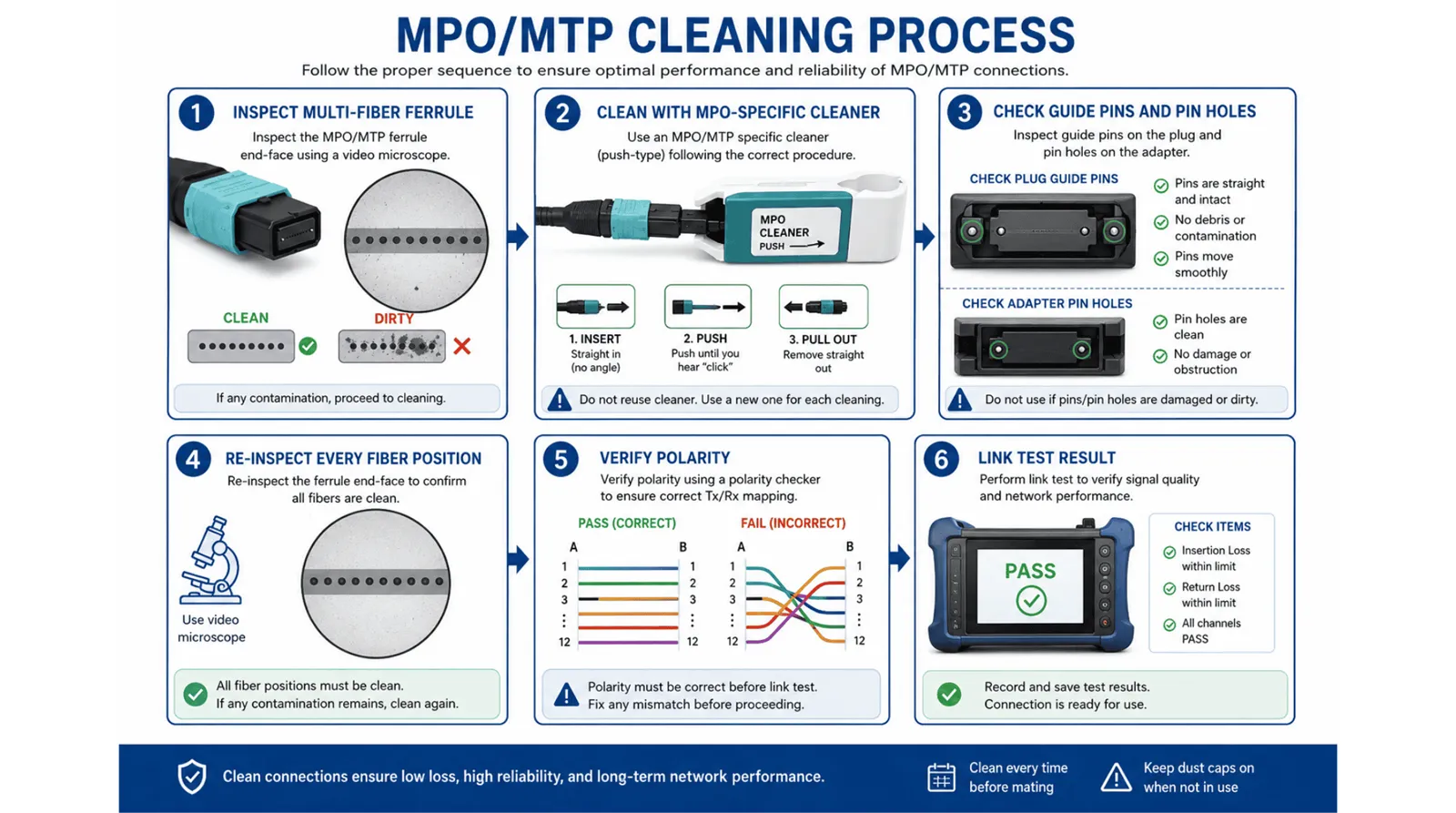
Fig. 5 - MPO/MTP connector cleaning and inspection process.
8. Top 10 Fiber Connector Cleaning Mistakes
Most cleaning failures are caused by technique, not tool cost. The following mistakes are common in field work, data center patching, and production testing.
- Touching the ferrule end face. Fingerprints leave oil film that often requires wet-then-dry cleaning.
- Using paper tissue or household wipes. These materials shed fibers and may scratch or contaminate the end face.
- Reusing wipes or swabs. A used wipe transfers old contamination onto the next connector.
- Skipping inspection. Without inspection, you cannot know whether cleaning is needed or whether it worked.
- Using diluted or old IPA. Low-purity or open-bottle IPA can leave residue and moisture on the end face.
- Wiping back and forth. Repeated motion spreads particles instead of moving them away from the optical area.
- Cleaning a connector that already passes. Unnecessary cleaning may add static, residue, or mechanical wear.
- Ignoring adapters and sleeves. A clean plug can be contaminated immediately by a dirty adapter port.
- Assuming new connectors are clean. Factory-cleaned connectors can collect dust during shipping, storage, or cap removal.
- Using the wrong cleaner size. A 2.5 mm cleaner cannot properly clean LC 1.25 mm ports, and a single-fiber cleaner cannot clean MPO ferrules.
9. Real-World Cleaning Scenarios
Cleaning decisions change by environment. The examples below separate standard requirements from practical field judgement.
Scenario 1: FTTH ONT Activation
An installer removes the dust cap from an SC/APC drop cable before connecting it to an ONT. The connector should be inspected first. If dust is visible, use an APC-rated one-click cleaner and re-inspect. If the ferrule was touched or exposed to construction dust, use wet-then-dry cleaning before mating.
Scenario 2: Data Center LC Duplex Cross-Connect
During a rack migration, LC duplex patch cords are disconnected and reconnected quickly. Each unmated connector should be capped or inspected before remating. For high-density panels, keep LC 1.25 mm one-click cleaners and adapter sticks at the rack to avoid using the wrong tool under time pressure.
Scenario 3: MPO Backbone Commissioning
Before 100G, 400G, or parallel-optics commissioning, inspect every MPO ferrule. A single contaminated fiber position can fail the whole trunk. Clean with an MPO-specific cleaner, inspect all fiber rows, confirm guide-pin cleanliness, and then continue with polarity and insertion-loss testing.
10. How Often Should Fiber Connectors Be Cleaned?
The safest rule is not "clean every time." The better rule is: inspect before every mating event and clean only if inspection fails. Fixed cleaning schedules are useful for maintenance planning, but they do not replace inspection.
| Environment | Contamination Risk | Recommended Practice | Typical Tool Kit |
|---|---|---|---|
| Clean lab / production bench | Low | Inspect before mating; clean only if needed. | FIP, cassette cleaner, wipes, fluid. |
| Data center rack | Medium | Inspect after cable changes; clean adapters during maintenance windows. | LC/MPO cleaners, adapter sticks, FIP. |
| Telecom room / ODF | Medium to high | Inspect before patching; keep ports capped when unused. | SC/LC one-click cleaners, swabs, wipes. |
| FTTH installation site | High | Inspect every SC/APC connector before ONT or splitter connection. | APC one-click cleaner, pre-wet swabs, portable scope. |
| Outdoor closure / construction site | Very high | Minimize exposure time; inspect after every access event. | Inspection probe, wet-dry kit, capped storage. |
Field guidance such as quarterly or semi-annual maintenance intervals should be adjusted by environment, port density, traffic criticality, and customer acceptance criteria.
11. Related Products for a Clean Fiber Link
Connector cleanliness also depends on the baseline quality of the cable assembly. Factory-terminated products should still be inspected before first field mating, but reliable polishing, end-face inspection, and IL/RL testing reduce the risk of receiving damaged or contaminated connectors.
Fiber One-Click Cleaners
For LC, SC, FC, ST, and MPO connector cleaning in field and rack environments.
View Fiber ToolsFiber Patch Cords
Factory-terminated LC, SC, APC, UPC, single-mode, and multimode patch cords.
View Patch CordsFiber Optic Pigtails
SC/APC, LC/UPC, and custom pigtails for ODF, closure, and FTTH termination work.
View PigtailsMPO/MTP Trunk Cables
Multi-fiber assemblies for high-density data center and backbone applications.
View MPO Cables12. FAQ
-
Q: How do you clean fiber optic connectors?
A: Inspect first. If contaminated, dry clean with a one-click cleaner or lint-free wipe. Re-inspect. If oil or film remains, use wet-then-dry cleaning and inspect again before mating.
Q: Should new fiber connectors be cleaned before use?
A: New connectors should be inspected before use. Clean them only if they fail inspection. Dust may enter during storage, shipping, or cap removal.
Q: Can I use IPA to clean fiber connectors?
A: Use approved fiber cleaning fluid where possible. High-purity IPA should only be a backup and should be followed immediately by a dry wipe to reduce residue risk.
Q: What is IEC 61300-3-35?
A: It is an international inspection standard for fiber connector end-face visual quality. It defines zones and acceptance criteria for scratches and defects.
Q: What happens if a fiber connector is dirty?
A: Contamination can increase insertion loss, reduce return loss, create reflections, and damage the ferrule surface during mating.
Q: How do I clean an APC connector?
A: Use an APC-rated one-click cleaner or a controlled linear wipe direction suitable for the 8° angled end face. Do not mate APC connectors with UPC connectors.
Q: How do I clean MPO/MTP connectors?
A: Use an MPO/MTP-specific cleaner. Inspect all fiber positions, guide pins, and pin holes before and after cleaning.
13. Standards & References
The following references should be checked against the latest project, customer, or regional requirements before publication or use in formal acceptance documentation.
Standards
- IEC 61300-3-35 - Basic test and measurement procedures for fiber optic interconnecting devices and passive components; visual inspection of fiber optic connectors and fiber-stub transceivers.
- IEC 61754 Series - Fiber optic interconnecting devices and passive components; connector interface standards.
- TIA-568.3-D - Optical fiber cabling and components standard.
- IEC 61280-4-1 - Fiber optic communication subsystem test procedures; installed cable plant attenuation measurement.
-