
Choosing the right port capacity for your patch panel in Fiber to the Home (FTTH) network planning may seem simple, but it can significantly impact the long-term development of your project.
Insufficient port capacity will require additional equipment or even rewiring as the number of users increases; excessive capacity will waste your initial investment, as a large patch panel will occupy valuable installation space. So, which port capacity is best for your project-8 ports, 16 ports, or 32 ports?
Core Positioning of the Three Capacities
|
Ports |
Typical Scenario |
Typical Subscribers |
Advantages |
Disadvantages |
|
8-port |
Single villa, small shop, low-density area |
2-8 |
Small size, low cost, flexible installation |
Limited expansion capacity |
|
16-port |
Multi-story residential unit, natural village, medium shop cluster |
10-16 |
Best cost-performance, moderate coverage, most widely used |
In-between capacity |
|
32-port |
High-rise residential floor, dense commercial area, large aggregation point |
20-32 |
Wide coverage per box, fewer nodes |
Large size, higher cost, requires more space |
Scenario 1: Rural FTTH – 16-Port Is the "Sweet Spot"
Rural areas are characterized by dispersed user distribution, wide coverage at each node, and predictable growth. Consider a village with 40 households spread across several streets as an example:
8-port solution – requires 5 patch panels. More patch panels mean more maintenance points and more feeder branches.
16-port solution – requires 3 patch panels (16+16+8). The number of patch panels is moderate, with each panel covering 10-15 households.
32-port solution – requires 2 patch panels. However, the larger size reduces flexibility when installing on utility poles, and the wider coverage per panel requires longer drop cables.
Conclusion: In rural areas, the 16-port patch panel strikes the best balance between coverage, installation flexibility, and cost, making it the most popular choice.
Scenario 2: Multi-Story Residential – 16-Port "Just Right"
Taking a typical six-story building as an example, with three households per floor and 18 households connected to each entrance:
8-port solution – requires three patch panels (8+8+2). Distributed deployment increases the number of devices in the corridor.
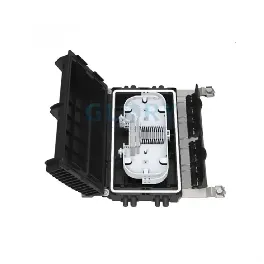
16-port solution – one 16-port patch panel can cover 16 households. The remaining two households can be served by an adjacent entrance or a small 8-port patch panel. One 16-port patch panel plus a small supplementary patch panel is very economical.
32-port solution – a 32-port patch panel is too large (18 households vs. 32 ports), and is usually difficult to install in the telecommunications room in the corridor.
Conclusion: For a standard multi-story residential entrance, a 16-port patch panel is "just right" – one patch panel can cover almost the entire entrance, eliminating the need for cabling from other entrances.
Scenario 3: High-Rise Residential – 32-Port Has the Edge
Assume a 20-story building with four apartments per floor, totaling 80 apartments per vertical cabling line. Using a layered cabling scheme:
One 16-port patch panel is installed every 3 floors (12 apartments), requiring approximately 7 patch panels.
One 32-port patch panel is installed every 6 floors (24 apartments), requiring approximately 4 patch panels.
In high-rise buildings, vertical space for telecommunications lines is limited, but the vertical direction is continuous. Although 32-port patch panels are larger, fewer panels mean fewer connection points, fewer potential points of failure, and cleaner cable management. Therefore, 32-port patch panels are generally the better choice for high-rise buildings.
Scenario 4: Retrofit of Older Buildings – 16-Port Offers Flexibility
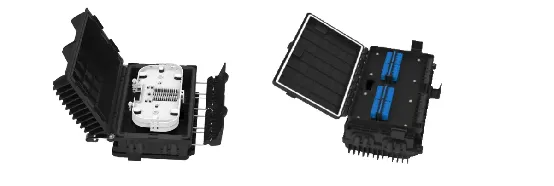
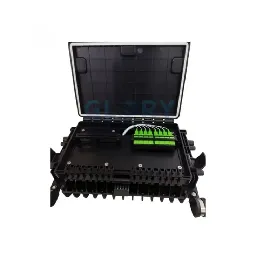
Renovation projects often face challenges such as diverse building structures, uneven user density, and short installation windows. This 16-port junction box is compact and offers flexible wall/pole mounting options, making it adaptable to various complex environments. Install one at each entrance, and add more as needed-deploy on demand, avoiding excessive upfront investment.
A Simple Decision Flow
Expected users per node ≤ 8 → Select 8 ports
Typical application scenarios: Detached villas, scattered rural residents, small shops
Expected users 10-18 → Select 16 ports (most commonly used)
Typical application scenarios: Entrances to multi-story residential buildings, natural villages, rows of shops
3.Expected users ≥ 20 and space allows → Select 32 ports
Typical application scenarios: High-rise residential floors, large commercial complexes, high-density gathering points
Beyond Capacity – Other Considerations
Splitter Ratio Matching – A 1:8 splitter goes with an 8-port splitter box, a 1:16 splitter with a 16-port splitter box, and a 1:32 splitter with a 32-port splitter box. A mismatch will result in wasted ports or uneven power distribution.
Installation Space – An 8-port splitter box can be installed in a small access panel; a 32-port splitter box requires sufficient wall or pole space.
Future Expansion – If you anticipate your user base will double within 3-5 years, it is recommended to choose a higher-capacity splitter box to avoid future replacements.
Fiber Optic Type – Ensure the splitter box is compatible with the type of drop cable (round or flat) you are using.
Summary
There is no absolute "best" among 8-port, 16-port, and 32-port – only "most suitable". The 16-port box has become the most common FTTH access layer specification because it fits the 10-18 subscriber density that appears everywhere – whether a small group of households in a rural village or a single entrance in a multi-story apartment building.